
Pipeline
Pipeline is now a gamechanger for busy procurement teams. A tool they rely on daily, not just to track projects, but to drive smarter spend decisions.
About
My role
Product Designer
In my role at Simfoni, I led the uplift of five key products; Pipeline, eSourcing, Analytics, BuyDesk, and Terminal, within an impressive four-month timeframe.
To keep this case study simple, I will only include the process for one of Simfoni’s products, Pipeline.
Product Strategy & Brand, Discovery, User Research, Interaction Design, Prototyping, Testing, Information Architecture
Who’s Simfoni?
Simfoni, a leader in spend intelligence software, provides businesses with tools to track and optimise their expenditures. Simfoni’s goal is to empower businesses with advanced spend intelligence and procurement solutions that enable them to track, analyse, and optimize their expenditures by providing actionable insights, AI and automation tools.
What’s Pipeline?
Pipeline helps procurement teams easily manage their sourcing projects by keeping all spend info and progress in one place. It makes tracking, decision-making, and saving money easier and faster. In Pipeline, users can see their baseline, budget and forecasted savings, alongside any deadlines for their sourcing projects. Pipeline has lots of large capabilities, but has faced several usability challenges.
Understand
Product training
I joined the company with some knowledge of the industry from my previous company, but of course, every product is different and it was crucial I understood how Pipeline worked. So, I participated in various activities including:
Product demos
Live Q&A sessions
Technical sprint meetings
Customer success meetings
Software exploration sessions
Help center feedback sessions
Design workshops
This helped me to understand the product from a user’s perspective and informed the design process.
Stakeholder input
Securing budget for product development
I developed a business case highlighting the project’s needs and goals. This included estimates of project hours, costs, and potential ROI. I employed the Why, What, and How method to communicate the benefits of a user-centric UX approach to stakeholders.

Stakeholder aims
I took part in regular meetings with Senior Management, Customer Success, Development, and Marketing Teams, to make sure the project aligned with business objectives and user needs.
Stakeholders wanted to
Make Pipeline product more intuitive and user-friendly, Increase the adoption rate among existing and new clients, Provide more actionable insights for better decision-making in procurement, Ensure that users fully leveraged all the features and AI tools, Help clients achieve significant cost savings through better spend management, and make the product scalable.
Defining the value
I started by understanding what customers value in Pipeline. My aim? To refine its value proposition by highlighting its tangible benefits for businesses and individuals.
By engaging closely with the frontline expertise of the sales and customer success teams, I gained invaluable first-hand knowledge of the features and functionalities that resonate the most with our customers. The involvement of the Senior Management Team (SMT) ensured that strategic perspectives seamlessly merged into the refinement process, aligning product enhancements with the overarching goals and vision of the organisation.
Software benefits
Pipeline simplifies the management of sourcing projects, helps businesses identify and engage with the best suppliers, tailors project stages to fit unique needs, centralises all project-related information, and scales to meet your needs.
Human benefits
Pipeline frees up time for procurement managers to focus on strategic decision-making, it saves time & reduces stress, it enables users to work more effectively together regardless of location, and the efficiencies gained translate into long-term savings & a more competitive business.
Research
Competitive analysis
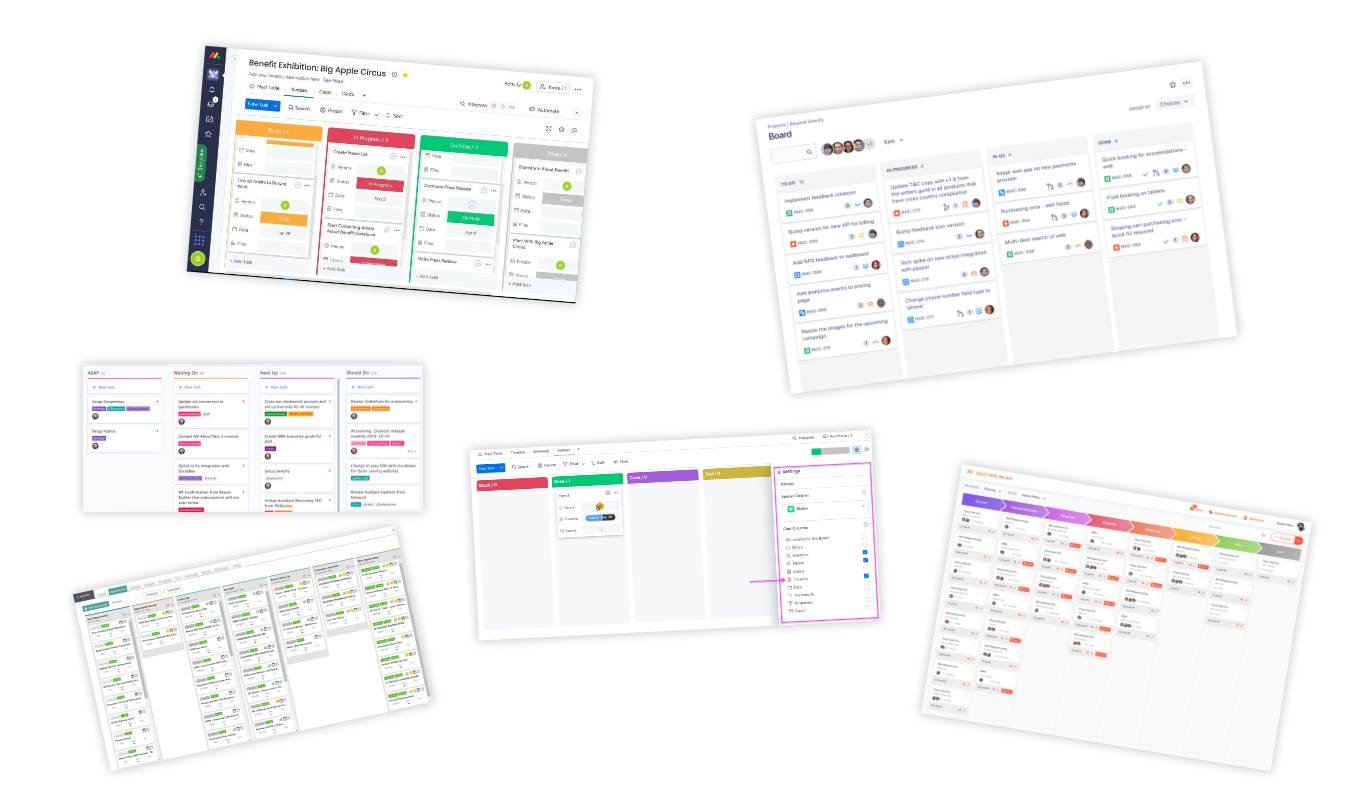
I did a competitive benchmarking exercise to identify best practices for project management tools.
This involved examining various tools designed by competitors (and non-competitors) to draw inspiration.
I gained inspiration from Jira and Monday.com, although they aren’t direct competitors, they had similar user experiences.
Help Centre analytics
Data from the help centre highlighted common user issues and confusion points, guiding my focus areas.
Analytics dive
Using Heap, I examined user behaviour to identify the user journey, areas of interest, issues and drop-off points. This analysis helped me understand areas needing improvement.
Heat mapping
Heat maps and user recordings revealed where users clicked, scrolled, and engaged. This provided insight into user behaviour and user journeys.
User testing
To gain a deep understanding of how our software was used in real-world scenarios, I organised user testing sessions with existing customers who were using Pipeline daily.
Companies such as Sony, IKEA, Visa, and DocuSign participated in these sessions, providing insights into their experiences and challenges.

Analysis
Personas & scenarios
Based on the research findings, I developed user personas representing key user groups (e.g., procurement managers). I created scenarios outlining their typical interactions with Pipeline to outline their real user needs.
Competitive analysis
I did a second round of competitive benchmarking here, but more of an analysis/inspiration step. I managed to get onto a demo with a competitor (SpendHQ) who had a great way of showing different project views. This gave me some ideas for areas of improvement, and also helped me find ways we could improve upon our competitors.
Card sorting
I organised user feedback and research into an affinity diagram to identify patterns and key areas of focus.
I then used the ‘task criticality x impact x frequency = severity’ method to organise all user feedback with severity scores, allowing me to focus on the most important pieces of feedback.

Problem severity
We diligently sifted through the 150+ pain points we uncovered using the ‘criticality x impact x frequency = severity’ method.
Task criticality – how important is the task to the user? (1 = low, 5 = critical)
Impact – how much of an impact does this issue have on the user’s task? (1 = suggestion, 5 = blocker)
Frequency (%) – how many times does this come up out of total participants?
Issues identified
I did a review of all my research to identify key issues impacting user experience. This involved finding the most severe pain points, I narrowed down these to a list of 3:
Unclear Navigation
Proposed solution: Introduced a stepper UI with accordion dropdowns for a guided, simplified journey.
Confusing Project Overviews
Proposed Solution: Improved card hierarchy, added progress indicators, and colour-coded stages.
Manual Time-Draining Processes
Solution: Added an AI Assistant and “Copy from Template” for smarter, faster project creation.
Design
User journeys
I mapped out user journeys to visualise the steps users take to complete tasks within Pipeline, and understand key touchpoints and pain points. This helped identify pain points and inefficiencies in the current navigation and project creation and management processes.
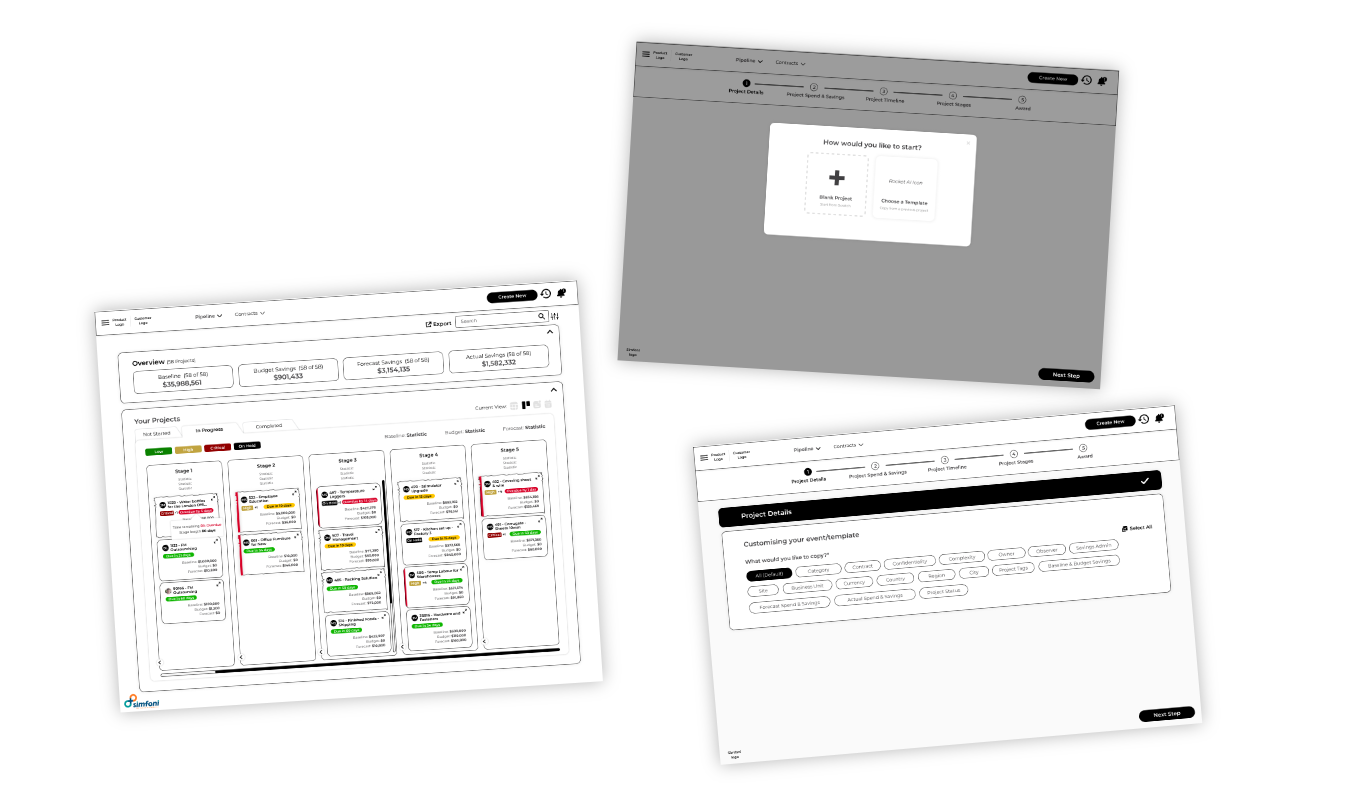
Low fidelity wireframes
Initial Sketches
These wireframes served as the first step in visualising the solutions to our navigation and project management issues.
User Feedback
Conducted initial testing sessions with low-fidelity wireframes to gather feedback.
Positives:
Users appreciated the simplified navigation, and said it was a much easier flow.
They said the project status indicators on the kanban project cards were clearer.
Pain Points:
Users expressed concerns the kanban cards had a lack of info.
Users also said they felt a ‘days overdue/to go’ would be better than saying ‘due on 12/05/2024’.
They also said it would be good if we could have some way of showing when a project has been neglected/inactive.
They also mentioned they would like to separate projects that are ‘not started’ and ‘completed’.
Users also requested a way of collapsing certain stages in kanban view.
Mid fidelity wireframes
SMT requested to transition directly from low fidelity to high fidelity wireframes to accelerate the time to market.
High fidelity wireframes
The high-fidelity wireframes for Pipeline provided an accurate representation of the refined user interface, incorporating precise elements, interactions, and visual details tailored to the improved navigation and project management features.
This stage was crucial for validating the design decisions and ensuring that each component aligned with user needs and business objectives, ultimately setting the stage for a seamless and intuitive experience for Pipeline users.
Further improvements
Kanban Cards: I included an ‘expand project card’ icon, so more information was included without compromising on the simplicity.

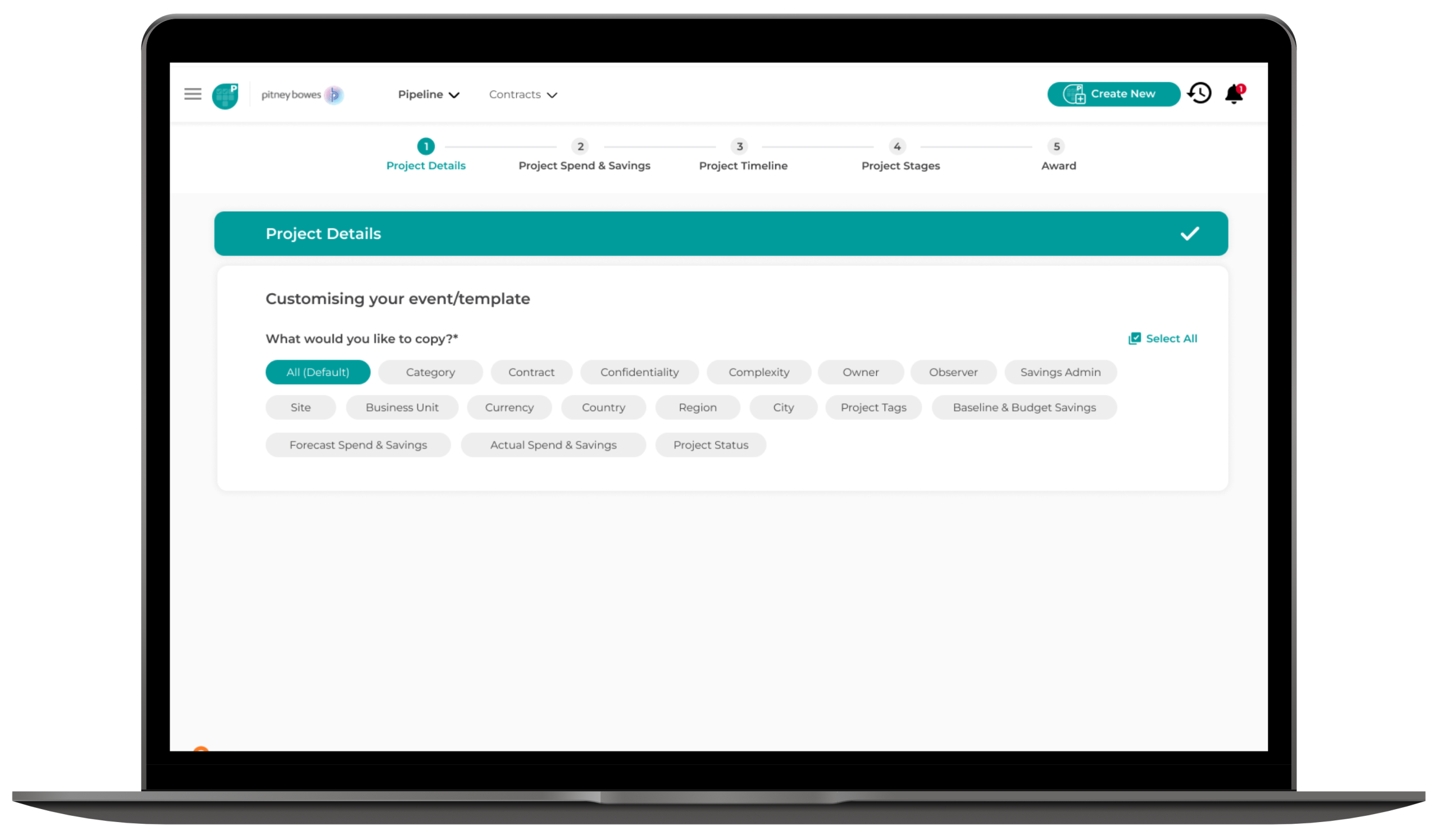
Stepper: We included a green tick instead of teal for a slight differentiation between the current task and previously completed tasks.

Due Date Cue: We changed from a date on the kanban cards, to how many days are left until the next stage is due, or how many days it’s overdue.

Interactive Elements: Incorporated interactive elements such as hover states, clickable prototypes, and animations.
Simplified Language: We simplified the names in the stepper to make it more concise and remove jargon.
Neglected Paper Feature: We added in a crinkly paper effect for projects that hadn’t been touched for a while, therefore inactive.

Stage Ages Feature: We introduced a new setting where when projects have different stage lengths, you can set a percentage to let you know how close you are to the end of the stage. For example: Project 1’s first stage is 10 days long and it’s got 8 days to go, so the due date indicator would be green. For Project 2, the stage length is 80 days but it’s got 8 days to go, therefore would be red. This setting can be turned on and off in settings. This works in tandem with the due dates, allowing the user to prioritise their time better.

Prototypes
Designing prototypes for Pipeline was a critical step in bringing the refined high-fidelity wireframes to life.
Interactive Prototypes
Developed interactive prototypes using high-fidelity wireframes. These prototypes allowed us to simulate real user interactions and gather more detailed feedback.
User Testing
Conducted extensive user testing sessions with interactive prototypes. Participants were asked to complete tasks using the new navigation and project management features.
Iterative Refinement
Based on user feedback, we iteratively refined the prototypes. This involved tweaking visual elements, adjusting interactions, and fine-tuning the overall flow
Designing a solution
Navigation
The final design features a stepper interface, accordion dropdowns, and a simpler flow. Now, users can easily see their progress and know what steps to take next.
Project Management
Enhanced project overview with status indicators, colour-coded tags, and customisable aging features. The new design allows users to manage projects more effectively and stay on top of deadlines.
Efficiency Tools
The AI Assistant and “Copy from Template” features significantly reduce the time required to set up and manage projects, making Pipeline a more efficient tool for users.
Results
Launch
As we approached the launch of the enhanced Pipeline, we prepared for a focused two-week sprint to finalise the implementation and ensure a smooth rollout.
This sprint was designed to address any last-minute adjustments, conduct final testing, and ensure that all enhancements were fully integrated and functioning as intended. The intensive, short-term effort was crucial for refining the product and making sure it met both user expectations and business goals before going live.
The stats
Pipeline is now a gamechanger for busy procurement teams, a tool they rely on daily, not just to track projects, but to drive smarter spend decisions.
%
boost in customer satisfaction scores, based on post-launch feedback survey.
%
increase in user adoption within the first month post-launch.
%
Increase in utilisation of key features and new AI tools
%
reduction in the product development cycle
What I learned
Communicating designs in a global team
I’ve learned how important strong communication skills are, especially when working with developers from different parts of the world. This experience has helped me explain my design ideas clearly and listen better, ensuring we were on the same page despite the distance.
Language is the design tool you can’t ignore
Collaborating with very technical people at Simfoni has taught me the importance of translating technical jargon into user-friendly language.
Colour is important in directing users
Using colour strategically became a key way to guide users through their tasks and highlight critical actions, improving their overall experience.
Thinking beyond direct competitors
Competitive benchmarking doesn’t have to be limited to direct competitors. Exploring tools from different industries opened up new ideas that helped us innovate and improve the user experience.